
Stage Design Software for Competitive Shooting
Pew Pew Stage Factory is stage design software for GPA, IDPA, USPSA, IPSC, PCSL, and ICORE. Build a stage in 3D and walk it before anyone drives a stake, or sketch it flat in 2D in a couple of minutes. Then plan the run, hand your setup crew a build sheet, and publish a match book your shooters can read online or in print - all from one platform.
Two Editors, One Platform
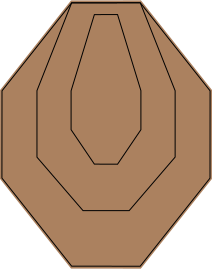
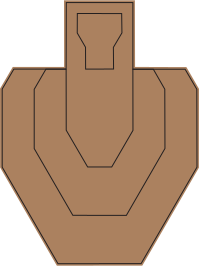
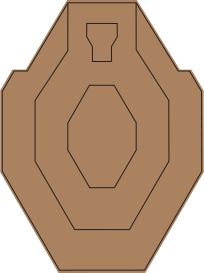
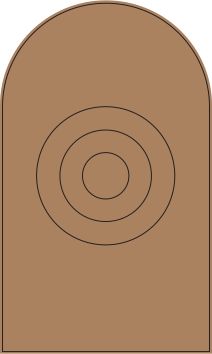
Open the 3D editor and you are already standing in a bay, ready to build. Drop in walls with doors and windows, barrels, GPA / IDPA / USPSA / IPSC / PCSL / ICORE cardboard, and steel - then walk the stage at par speed, or put on a headset and stand in it, and find the awkward transition now instead of on match morning. Sight lines are cast as real shadow, so the floor greys out exactly where your shooter cannot see.
Moving stands are modelled as the mechanisms they are, not as canned animations: a swinger is a damped pendulum that rests loaded on its start side and decays to vertical, an out-and-back swings out and settles back, and a clamshell gives you an exposure window measured in tenths before the no-shoot covers the threat. Set the periods and the travel times and they run on your numbers. Wire any of them to a stomp box or a steel popper and the stage fires itself when the shooter trips it, doors included. When you want the stage on real ground, trace your own range from satellite imagery, berms and all.
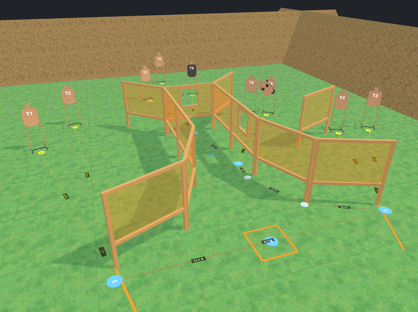
The 2D editor is the fast way in. Drag on walls, targets, steel, and props, or draw the rest yourself with the line, rectangle, circle, and free-draw tools - fault lines, start boxes, and the one-off shapes no prop library ships. The bay is laid out flat while targets, steel, and props are drawn in perspective, the way a stage diagram has always read, so a shooter can tell at a glance what is facing them. Size the field in yards to match the bay you actually shoot, and upload your own prop artwork - a PNG or a photo comes back as a clean, scalable SVG in your personal library.
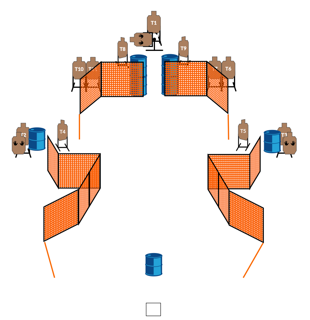
Both editors autosave as you work and feed the same stage library, version history, and match books, so you can pick the right tool for each stage without leaving the platform.
3D - Stand In It First
- Opens on a ready-made bay - start building immediately
- Walk it at par speed, or in VR
- Moving stands that move, on timing you set
- Stomp boxes and steel that trigger stands and doors
- Sight lines cast as shadow
- A build sheet your setup crew can carry
- Share a stage as a link anyone can spin around
- Or trace your actual range from satellite, berms and all
2D - Sketch It Fast
- Draw what no prop library ships: lines, boxes, circles, free-hand
- Upload your own prop art and it becomes a clean scalable SVG
- Flat layout with targets drawn in perspective, the way a stage diagram reads
- Field sized in yards to match your actual bay
- Layer control, mirroring, and a scratchpad for parts you reuse
Both Editors
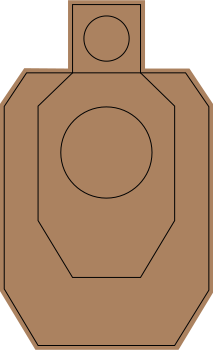
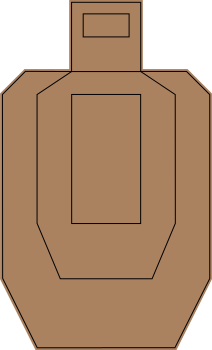
- All five target types, eight hard-cover variants, and non-threats
- Steel A and B, configurable plates, Texas Star
- Walls with doors and windows
- Shooting positions, sight lines, and shot angles
- GPA par math, par wizard, and start-position presets
- Autosave, version history, templates, print and PDF
IDPA
Comp
Plan the Run, Not Just the Layout
Stage design is half the job. Both editors ship with a shooting-position planner: drop positions, mark standing, kneeling, prone, or on-the-move, link the targets engaged from each one, and get distances and movement times back. A signed shot-angle overlay flags awkward sweeps before they show up on match day, and one click numbers your targets T1, T2, T3 in the order a shooter actually meets them.
Sight lines answer the question directly in either editor: turn them on and the floor greys out everywhere the shooter cannot see from that position, so cover reads the way it does on the range. In 3D the test runs at peeking eye height against the actual geometry, so a stacked barrel blocks while a single one you can shoot over does not, and a window stays a designed sight line whether its leaf is open or shut.
Then hit Par Run. The stage runs itself: the shooter walks your position chain, draws, engages each target you marked, trips the activators as they shoot them, and finishes on the clock. The timing is not a guess or a canned animation - it is the same GPA par calculation from the panel, spent second by second, with the draw held before the first shot and the movement paced to the route your waypoints actually describe.
Shooters get the same planner in Book Mode - a phone-friendly view that lets them sketch their own run on top of any stage in your match book. Their work saves automatically for sixty days, and no login is required.
A Living Stage Library
Every stage you publish becomes part of a searchable, filterable community library - sorted by scoring type, target count, round count, concealment, and more. Members rate stages from one to five stars, and lineage tracking shows the chain of designers who built on each other's work.
Every save also takes a versioned snapshot. The last ten versions are kept on disk, so you can view, restore, or copy from any point in a stage's history without fear of losing a good idea.
Make It Yours
The default prop set covers most stages, but designers always have one more idea. Upload a PNG, JPG, or GIF and the platform converts it into a clean, scalable SVG ready to drop on the stage. Calibrate the size once and it lives in your personal prop library forever.
Save reusable groupings of props, targets, and walls as personal templates, then drag them into any stage to skip the busywork and get straight to the design.
In 3D it goes further. Build your own wall shapes in the custom wall creator instead of settling for the stock panels, and model the bays you actually shoot - trace the perimeter off satellite imagery, set the berms, pick the ground surface, and every stage you design there sits on real ground. Share a bay and the whole membership can build on it.
Sponsors get their due too. Upload a logo, trace it to clean vector, and hang it on a wall or a barrel in the stage itself - so the people paying for the match see their name in the diagram, not just on a banner at the gate.
And much more
Print & PDF Output
Crisp vector stage diagrams with embedded QR codes that link straight to the live online version.
Match Books
Build full match books, arrange stages, and drop in satellite photos. Every book is both an online book your shooters can browse on their phone and a print-ready PDF - same book, two ways to read it.
See Example
Build Sheet
A printable bill of materials for any 3D stage: every wall, stand, popper, and prop, with sizes and hard-cover callouts. Hand it to the crew and walk away.
Share a Stage in 3D
Send anyone a link to a 3D stage and they can orbit it, zoom in, and walk it in their browser - no account, no install.
GPA Par Calculations
Galactic Pistol Alliance par-time math is built in, with live updates as you add targets and steel, and a step-by-step wizard when you want to check the factors yourself.
The GPA Rulebook
The full rulebook, searchable and tagged by topic, with every published version kept and a PDF ready to download.
Sponsor Logos
Upload a logo, trace it to vector, and place it on stage walls, barrels, or a dedicated page in the match book.
Clubs
Add a club subscription so a co-admin can ride your account, share stages, and collaborate on match books.
Mobile-Ready
Touch drag-and-drop, pinch-zoom, and a responsive layout that works on phones and tablets.
Design it, walk it, time it, and print it - before you ever haul a wall panel out of the shed.
Ready to Design Better Stages?
Full access to both editors for 45 days.
Just $12/year. Lock in this rate now.
No card information required till you're ready to buy!